Analyze and Extract Color Palettes with MZ Color Palette
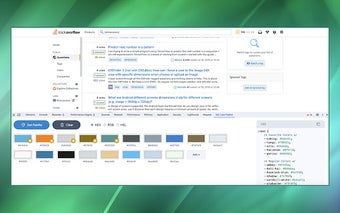
MZ Color Palette is a Chrome extension developed by jsoceandiver that allows users to analyze and extract color palettes from the visible area of any open tab. Whether you're a web developer looking to match a website's color scheme or a designer seeking inspiration from different web pages, this extension simplifies the process and provides the necessary tools for efficient and creative work.
With MZ Color Palette, you can extract colors from the visible area of any web page, gaining insight into the website's color scheme. The extension supports HEX, RGB, and HSL color types, allowing you to work with colors in your preferred format. Additionally, it generates CSS with color variables for the extracted colors, making it easy to integrate them into your projects with a professional and consistent look.
All extracted colors are conveniently stored within the extension, ensuring that you have a comprehensive record of the palettes you've encountered and created. MZ Color Palette also offers a favorite colors support system, allowing you to mark and organize colors that inspire you or that you plan to use frequently.
Privacy is a top priority for MZ Color Palette. The extension does not track or store user data, ensuring a secure and private browsing experience.
To use MZ Color Palette, simply install the Chrome extension from the Chrome Web Store. Once installed, open your Chrome browser, navigate to a web page you'd like to analyze, and open Chrome's Developer Tools. In the Developer Tools panel, you'll find the "MZ Color Palette" tab added by the extension.
With its powerful features and user-friendly interface, MZ Color Palette is a valuable tool for web developers and designers alike, making color analysis and extraction a seamless and efficient process.